> For the complete documentation index, see [llms.txt](https://kdongs.gitbook.io/kdocs/llms.txt). Markdown versions of documentation pages are available by appending `.md` to page URLs; this page is available as [Markdown](https://kdongs.gitbook.io/kdocs/gitflow/about.md).
# About
## [Gitflow](https://www.atlassian.com/git/tutorials/comparing-workflows/gitflow-workflow)
{% embed url="" %}
More info on Gitflow
{% endembed %}
{% hint style="danger" %}
If you use the Extension git-flow, keep in mind that it will commit and push to `main` automatically through the scripts execution.
**Thus you may not be able to create Pull Requests**.
{% endhint %}
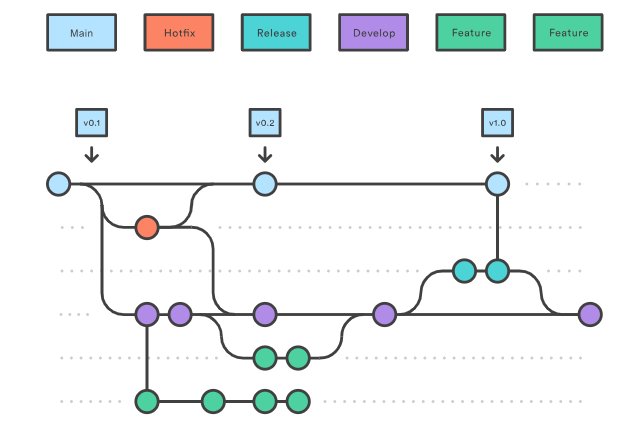
It is an alternative Git branching model that involves the use of feature branches and multiple primary branches.
It has numerous, longer-lived branches and larger commits.
Under this model, developers create a feature branch and delay merging it to the main trunk branch until the feature is complete.
{% hint style="warning" %}
This can lead to higher risk of deviating from the trunk branch and introduce conflicting updates.
{% endhint %}
{% hint style="info" %}
Gitflow can be used for scheluded realese cycle projects and for DevOps best practices of `CD`.
{% endhint %}
#### Gitflow vs Feature Branch
It doesn't add new concepts or commands from what is required from [#feature-branch](#feature-branch "mention"), instead it assigns very specific roles to different branches and defines how and when they should interact.
In addition to `feature` branche, it uses individual branches for preparing, maintaining, and recording releases.
### Develop and Main branches
We will have two branches to record the history of the project.
Other developers should now clone the central repository and create a tracking branch for `develop`.
#### `main` branch
Stores the official release history, **but only an abridged version**.
{% hint style="warning" %}
All commits here should be tagged with a version number.
{% endhint %}
#### `develop` branch
Serves as an integration branch for features, meaning `done` feature branches will ONLY be merged here. (Never to `main`)
#### Creating the `develop` branch
Manually:
```bash
git branch develop
git push -u origin develop
```
Using git-flow extension:
If using git-flow extension library, executing `git flow init` on an existing repo will create the `develop` branch.
```bash
$ git flow init
Initialized empty Git repository in ~/project/.git/
No branches exist yet. Base branches must be created now.
Branch name for production releases: [main]
Branch name for "next release" development: [develop]
How to name your supporting branch prefixes?
Feature branches? [feature/]
Release branches? [release/]
Hotfix branches? [hotfix/]
Support branches? [support/]
Version tag prefix? []
$ git branch
* develop
main
```
### Feature branches
Each new feature should reside in it's own branch, which can be pushed to the central repositoy for `backup/collaboration`.
{% hint style="danger" %}
`feature` branches will always branch off from `develop`, **never from** `main`.
When it is complete, it gets merged back to `develop`.
{% endhint %}
{% hint style="info" %}
Note: `feature` branches combined with the `develop` branch is [#feature-branches](#feature-branches "mention") workflow.
{% endhint %}
#### Feature steps (No PR)
1. Create a new local `feature/` from `develop`.
2. Work on feature...
3. Merge to `develop`.
4. Delete the `feature/`.
#### Feature steps (With PR and Rulesets)
*Working with PR and Rulesets will not let you merge or push to* `main` *or* `develop` *from terminal.*
1. Create a new local `feature/` from `develop`.
2. Work on feature...
3. When finished, go to GitHub and create a PR on `feature/`.
4. Finish the PR, merging to `develop`.
5. On your local repository delete the `feature/`.
#### Creating `feature` branches
Manually:
```bash
git checkout develop
git checkout -b feature/
```
With git-flow extension:
```bash
git flow feature start
```
#### Finishing a `feature` branch
Manually:
```bash
git checkout develop
git merge feature/
git branch -D feature/
```
With git-flow extension:
```bash
git flow feature finish
```
### Release branches
Once `develop` has acquired enough features for a release *(or a predetermined release date is approaching)*, you fork a `release` branch off of `develop`.
{% hint style="warning" %}
Creating this branch starts the next release cycle, so **no new features can be added after this point**, ONLY: Bug fixes, documentation generation, and other release-oriented tasks should go into `release` branch.
{% endhint %}
Once it is ready to ship, the `release` branch gets merged into (`main` and `develop`) and tagged with a version number.
{% hint style="warning" %}
You can follow [Broken mention](broken://pages/Y65Cg9Mj9vNW9pED9tbK) versioning scheme of `..`.
{% endhint %}
{% hint style="danger" %}
`release` branches will always branch off from `develop`.
When it is complete, it gets merged into `main` and `develop`.
{% endhint %}
#### Release steps (No PR)
1. Create a new local `release/` from `develop`.
2. Add docs, bugfixes, hotfixes....
3. Merge to `main` and `develop`.
4. Delete the `release/`.
5. Tag the commit on `main` with an updated version number.
#### Release steps (With PR and Rulesets)
*Working with PR and Rulesets will not let you merge or push to* `main` *or* `develop` *from terminal.*
1. Create a new local `release/` from `develop`.
2. Add docs, bugfixes, hotfixes....
3. When finished, go to GitHub and create a PR on `release/`.
4. Finish the PR, merging to `develop`.
5. Manually merge squash `release/` into `main`.
6. Create a new Release on GitHub with an updated `` or `` version number.
7. On your local repository delete the `release/`.
#### Creating `release` branches
Manually:
```bash
git checkout develop
git checkout -b release/0.1.0
```
With git-flow extension:
```bash
git flow release start 0.1.0
```
#### Finishing a `release` branch
Manually:
```bash
git checkout main
git merge release/0.1.0
git checkout develop
git merge release/0.1.0
git branch -D release/0.1.0
```
With git-flow extension:
```bash
git flow release finish '0.1.0'
```
### Hotfix branches
Maintenance or hotfix branches are used to quicky patch production releases.
This is the only branch that should fork from `main`.
{% hint style="danger" %}
`hotfix` branches will always branch off from `main`.
When it is complete, it gets merged into `main` and (`develop` OR the current `release` branch).
{% endhint %}
{% hint style="warning" %}
You can follow [Broken mention](broken://pages/Y65Cg9Mj9vNW9pED9tbK) versioning scheme of `..`.
{% endhint %}
#### Hotfix steps (No PR)
1. Create a new local `hotfix/` from `main`.
2. Work on the hotfix...
3. Merge to `main` and (`develop` or `release`).
4. Delete the `hotfix/`.
5. Tag the commit on `main` with an updated version number.
#### Hotfix steps (With PR and Rulesets)
*Working with PR and Rulesets will not let you merge or push to* `main` *or* `develop` *from terminal.*
1. Create a new local `hotfix/` from `main`.
2. Work on the hotfix...
3. When finished, go to GitHub and create a PR on `hotfix/`.
4. Finish PR, and merge on `main`.
5. Manually merge squash `hotfix/` into `develop` or `release`.
6. Create a new Release on GitHub with an updated `` version number.
7. On your local repository delete the `hotfix/`.
#### Creating `hotfix` branches
Manually:
```bash
git checkout main
git checkout -b hotfix/
```
With git-flow extension:
```bash
git flow hotfix start
```
#### Finishing a `hotfix` branch
Manually:
```bash
git checkout main
git merge hotfix/
git checkout develop
git merge hotfix/
git branch -D hotfix/
```
With git-flow extension:
```bash
git flow hotfix finish
```
## [Feature Branch](https://www.atlassian.com/git/tutorials/comparing-workflows/feature-branch-workflow)
## [Forking](https://www.atlassian.com/git/tutorials/comparing-workflows/forking-workflow)