> For the complete documentation index, see [llms.txt](https://kdongs.gitbook.io/kdocs/llms.txt). Markdown versions of documentation pages are available by appending `.md` to page URLs; this page is available as [Markdown](https://kdongs.gitbook.io/kdocs/rabbitmq/rabbitmq.md).
# RabbitMQ
{% embed url="" %}
## [About](https://www.rabbitmq.com/docs)
It is a message broker. It implements `AMQP`, `MQTT`, `STOMP`, and `HTTP` protocols.
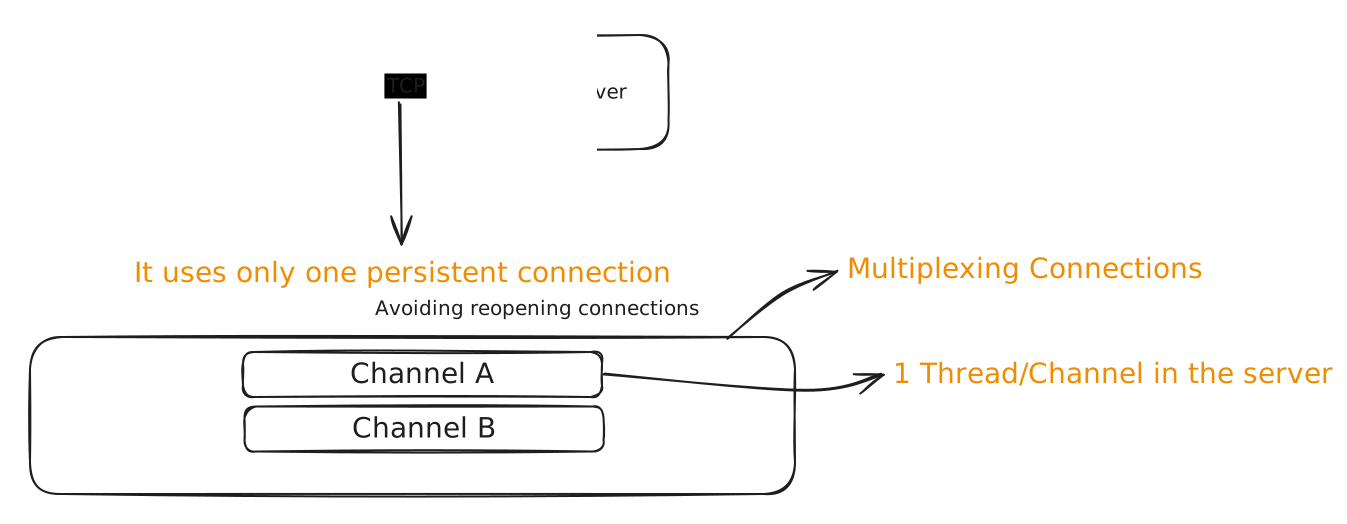 ### Basic Functionality
 ## Publisher
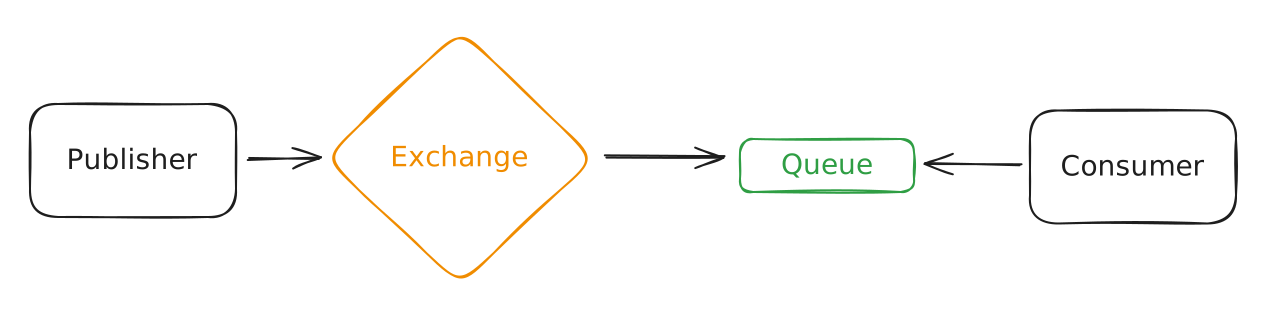
A Publisher send new messages to the Exchange.
{% hint style="warning" %}
**Publishers don't publish directly to Queues.**
Since messages can be delivered to multiple Queues at the same time, the Publisher send this message to an Exchange.
{% endhint %}
### Confirms
It is a resource/message that a Publisher can expect from the Exchange to confirm that the message was received by it.
This helps with reliability.
{% hint style="info" %}
Message sent will have an `ID`, without it, confirmation is not possible.
**The** `ID` **is an interger and provided by the developer.**
{% endhint %}
The Publisher either receives an `ack` or `nack` from the Exchange.
## Consumer
A Consumer consumes messages.
{% hint style="info" %}
If there are multiple consumers to a same Queue, RabbitMQ distributes each message to one Consumer, even if one Consumer alone could handle all the messages.
{% endhint %}
### Acknowledgement
It is a resource/message that a Consumer can emit to confirm that it processed the message succesfully.
This helps with reliability.
There are three types of acknowledgement:
#### `Basic.Ack`
It is a positive acknowledgement, to state the message was processed sucessfully.
#### `Basic.Reject`
It is a negative acknowledgement, to state the there was an error processing the message. (Of any type)
Putting the message back on the Queue.
#### `Basic.Nack`
The same as `Basic.Reject` but it can reject multiple messages at once.
## Exchange
Receives and process messages from Publishers, to figure it out to which Queues it should send to.
### Types of Exchange
#### Direct
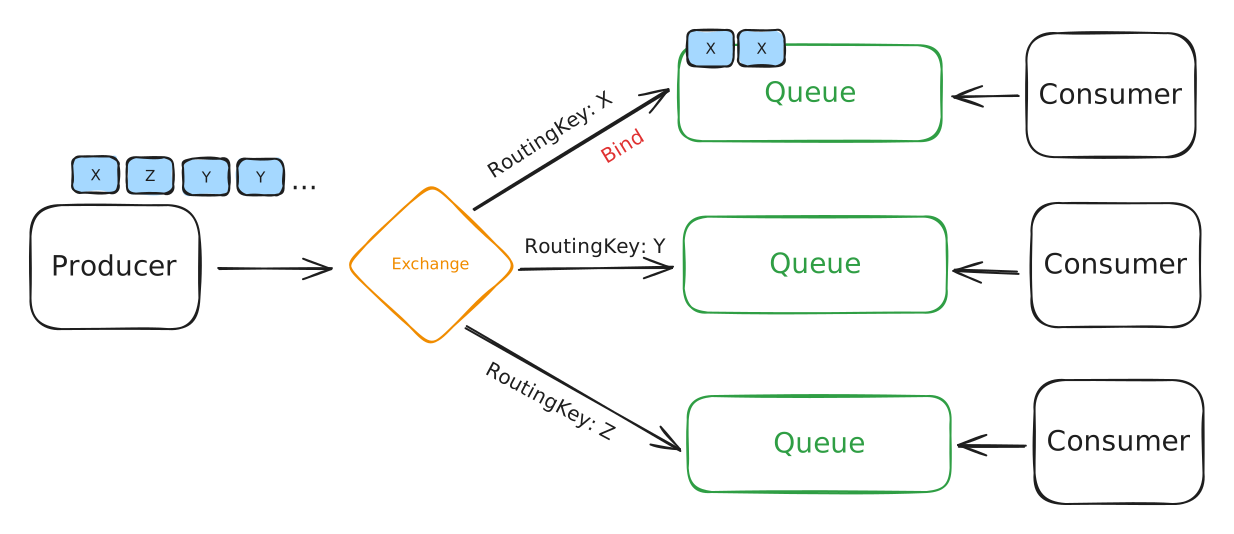
Messages sent to this Exchange are sent to specific Queues. (Through `Binds`)
`Bind` is the process to relate a Queue to the Exchange, by creating a specific `RoutingKey`.
## Publisher
A Publisher send new messages to the Exchange.
{% hint style="warning" %}
**Publishers don't publish directly to Queues.**
Since messages can be delivered to multiple Queues at the same time, the Publisher send this message to an Exchange.
{% endhint %}
### Confirms
It is a resource/message that a Publisher can expect from the Exchange to confirm that the message was received by it.
This helps with reliability.
{% hint style="info" %}
Message sent will have an `ID`, without it, confirmation is not possible.
**The** `ID` **is an interger and provided by the developer.**
{% endhint %}
The Publisher either receives an `ack` or `nack` from the Exchange.
## Consumer
A Consumer consumes messages.
{% hint style="info" %}
If there are multiple consumers to a same Queue, RabbitMQ distributes each message to one Consumer, even if one Consumer alone could handle all the messages.
{% endhint %}
### Acknowledgement
It is a resource/message that a Consumer can emit to confirm that it processed the message succesfully.
This helps with reliability.
There are three types of acknowledgement:
#### `Basic.Ack`
It is a positive acknowledgement, to state the message was processed sucessfully.
#### `Basic.Reject`
It is a negative acknowledgement, to state the there was an error processing the message. (Of any type)
Putting the message back on the Queue.
#### `Basic.Nack`
The same as `Basic.Reject` but it can reject multiple messages at once.
## Exchange
Receives and process messages from Publishers, to figure it out to which Queues it should send to.
### Types of Exchange
#### Direct
Messages sent to this Exchange are sent to specific Queues. (Through `Binds`)
`Bind` is the process to relate a Queue to the Exchange, by creating a specific `RoutingKey`.
 #### Fanout
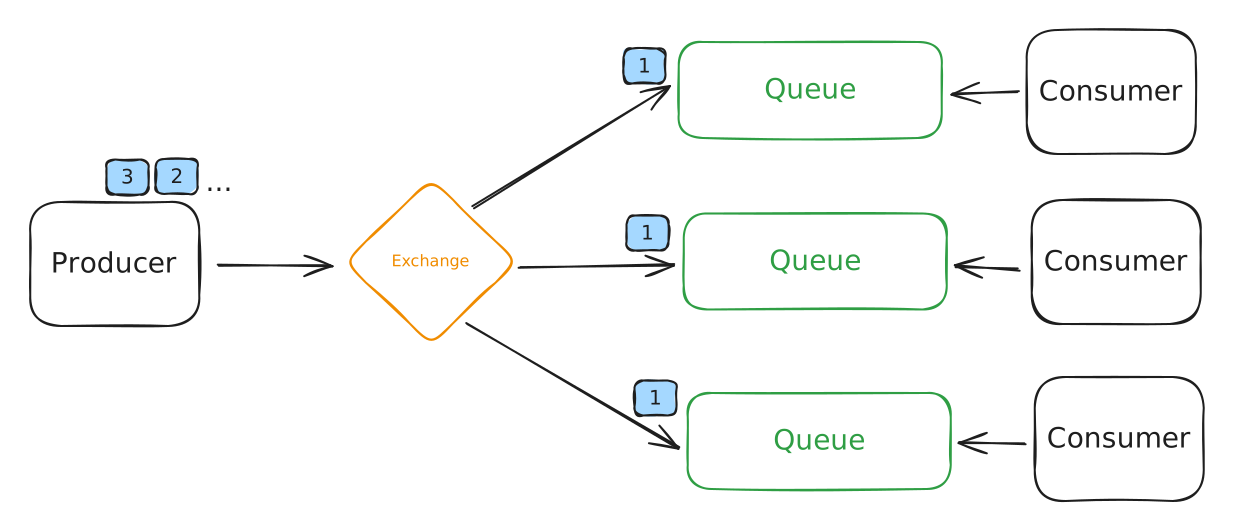
Messages sent to this Exchange are sent **every Queue** that is **binded** to this Exchange.
The Exchange replicates the message to every Queue that should receive it.
#### Fanout
Messages sent to this Exchange are sent **every Queue** that is **binded** to this Exchange.
The Exchange replicates the message to every Queue that should receive it.
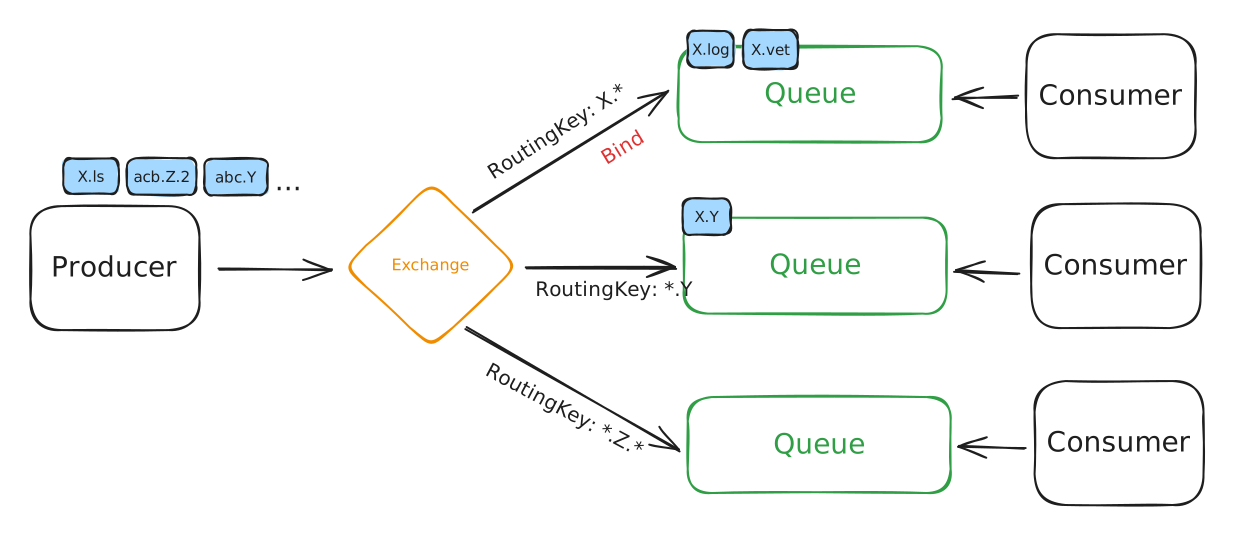
 #### Topic
These Exchanges can have rules, so that depending on the Message type (`RoutingKey`), it will only deliver on desired Queues.
The `RoutingKey` can hold Regular Expressions. (Like `X.*`, `*.Y`, `*.Z.*`)
#### Topic
These Exchanges can have rules, so that depending on the Message type (`RoutingKey`), it will only deliver on desired Queues.
The `RoutingKey` can hold Regular Expressions. (Like `X.*`, `*.Y`, `*.Z.*`)
 #### Headers
These Exchanges will read on the Message Header, which Queues it should deliver.
{% hint style="warning" %}
Not really used.
{% endhint %}
## [Queues](https://www.rabbitmq.com/docs/classic-queues)
They behave by default as `FIFO` (First In, First Out). *(There are ways to use priority in messages though)*
{% hint style="warning" %}
Classic Queues may keep up to `2048` messages in memory, depending on the consumer rate.
Idle Queues will reduce their memory usage. *(This can sometimes result in spikes when performing operations that affect many Queues)*
{% endhint %}
### Main Properties
#### Durable
Configure the Queue to be persistent even after the Broker restarts.
Helps with reliability.
#### Auto-delete
The Queue is automatic deleted when the Consumer disconnects.
#### Expiry
The Queue is deleted after `N` time without Consumer and Publisher activity.
#### [Message TTL](https://www.rabbitmq.com/docs/ttl)
`N` amount of time that an unconsumed message has before it is deleted.
#### [Max Lenght or bytes](https://www.rabbitmq.com/docs/maxlength)
`Lenght`: The number of messages that a Queue should hold.
`Bytes`: The maxium number of bytes a message can have.
#### Overflow
When a Queue is full of message there are some policies to what it should do:
`Drop Head` policy: Removes the head of the Queue *(Oldest message)*
`Reject Publish` policy: Just reject new messages to come in the Queue.
#### Exclusive
Only the Channel that created the Queue can access it, to Consume or Publish.
### [Dead Letter Queues](https://www.rabbitmq.com/docs/dlx)
They are special Queues that holds unprocessed messages from other Queues. *(Messages that expired can also be sent there)*
There are some messages that enter a Queue but for any reason are not processed, so they just hang there.
So, you can configure that these message get forwarded to a specific Exchange that routes them to a `Dead Letter Queue`.
Then they can be consumed by another system that checks why they were not consumed.
### [Lazy Queues](https://www.rabbitmq.com/docs/lazy-queues)
Messages are stored in disks.
Queues that receive too many messages may not get the job done and consume too much memory. So these Lazy Queues store them in disks, too decrease resource consumption.
{% hint style="danger" %}
The downside is the **high I/O** at disks.
{% endhint %}
#### Headers
These Exchanges will read on the Message Header, which Queues it should deliver.
{% hint style="warning" %}
Not really used.
{% endhint %}
## [Queues](https://www.rabbitmq.com/docs/classic-queues)
They behave by default as `FIFO` (First In, First Out). *(There are ways to use priority in messages though)*
{% hint style="warning" %}
Classic Queues may keep up to `2048` messages in memory, depending on the consumer rate.
Idle Queues will reduce their memory usage. *(This can sometimes result in spikes when performing operations that affect many Queues)*
{% endhint %}
### Main Properties
#### Durable
Configure the Queue to be persistent even after the Broker restarts.
Helps with reliability.
#### Auto-delete
The Queue is automatic deleted when the Consumer disconnects.
#### Expiry
The Queue is deleted after `N` time without Consumer and Publisher activity.
#### [Message TTL](https://www.rabbitmq.com/docs/ttl)
`N` amount of time that an unconsumed message has before it is deleted.
#### [Max Lenght or bytes](https://www.rabbitmq.com/docs/maxlength)
`Lenght`: The number of messages that a Queue should hold.
`Bytes`: The maxium number of bytes a message can have.
#### Overflow
When a Queue is full of message there are some policies to what it should do:
`Drop Head` policy: Removes the head of the Queue *(Oldest message)*
`Reject Publish` policy: Just reject new messages to come in the Queue.
#### Exclusive
Only the Channel that created the Queue can access it, to Consume or Publish.
### [Dead Letter Queues](https://www.rabbitmq.com/docs/dlx)
They are special Queues that holds unprocessed messages from other Queues. *(Messages that expired can also be sent there)*
There are some messages that enter a Queue but for any reason are not processed, so they just hang there.
So, you can configure that these message get forwarded to a specific Exchange that routes them to a `Dead Letter Queue`.
Then they can be consumed by another system that checks why they were not consumed.
### [Lazy Queues](https://www.rabbitmq.com/docs/lazy-queues)
Messages are stored in disks.
Queues that receive too many messages may not get the job done and consume too much memory. So these Lazy Queues store them in disks, too decrease resource consumption.
{% hint style="danger" %}
The downside is the **high I/O** at disks.
{% endhint %}