# Scrum Events
## About
All the 4 scrum events MUST be executed:
* Sprint Planning
* Daily Scrum
* Sprint Review
* Sprint Retrospective
They are key to create regularity and minimize the need for meetings not defined in Scrum.
To keep the Scrum Team focused, all the events are time-boxed, and the Scrum Guide prescribes a maximum duration for each one of them.
The team must define their lengths before starting it, which means that they MUST be defined before the Sprint Planning meeting, and it CANNOT be modified.
These events are a formal opportunity to inspect and adapt something, but it does not mean that meetings themselves are formal.
## Sprint ⭐
*"It is the Heart of Scrum."*
Time-boxed to, at most, 1 month, and MUST have fixed duration. They CAN change, but not frequently.
* Although, it can be short enough to handle business risks, or to synchronize with other business events. The Sprints help the Scrum Team to control Risks.
During the Sprint:
* No changes are made that would endanger the Sprint Goal.
* Quality Goals do not decrease.
* The Product Backlog is refined as needed.
* The Scope may be clarified and re-negotiated with the PO as more is learned.
A Sprint is over only when the time-box elapses, the exception is when the Sprint is canceled.
### Sprint Outcomes
* A Done Increment.
* Some done features.
* A part of the software that is available to end-users.
### Sprint Cancelling
Only the PO has the authority to cancel a Sprint.
* If part of the work is usable, it is considered Done.
* Done backlog items are reviewed.
* All incomplete backlog items are re-estimeted and put back in the Product Backlog.
### Sprint Monitoring
Burn-Up, Burn-Down or Cumulative Flow could be used for the Sprint monitoring.
## Sprint Planning ⭐
This event initiates the Sprint, by laying out the work to performed for the Sprint.
When the Scrum Team defines the goal of what to build and the flexible plan to guide achieving it.
The Plan is not fully formulated in the Sprint Planning, it can change.
The Sprint Backlog is the OUTPUT of a Sprint Planning.
**For the PO, planning efforts start even before Sprint Planning.**
* The must a set of Product Backlog Items,
* And their mapping to the Product Goal.
### The Input of Sprint Planning
* Projected capacity of the Developers during the Sprint.
* The Definition of Done.
* The Product Backlog.
* Past performance of the Developers.
### Who participates in the Sprint Planning?
The Scrum Team, but they may invite others to attend for advice like:
* An invited specialist.
### How do we execute this Sprint Planning?
The event has 3 topics to be addressed.
* Why is this Sprint valuable? (Craft the Sprint Goal)
* It begins with the PO discussing the opportunities for increasing the product's value and utility and how the current Sprint can address it.
* As a consequence the whole Scrum Team defines a Goal.
* What can be done in this Sprint? (Select the Backlog items)
* For this purpose, the Developers select items from the Backlog through discussion with the PO.
* Another factor that should be considered, is the Definition of Done, because the more stringent it is, the longer it might take to get Done with each Backlog item.
* How will the chosen work get done? (Craft the Sprint Plan)
* The developers might use information, such as the upcoming capacity - which is about how many hours available the Developers have for this Sprint.
* For instance, will anybody be out of the office during the Sprint?
* Like vacations.
* Further the Developers could also consider past performance as a reference.
* Like seeing how many points were burned in past Sprints.
Since the developers are the ones to turn Backlog items into Increments of Value, they have the final word.
Most Scrum teams, decompose the Backlog items into technical tasks, which are smaller chunks of work often to units of one day or less.
## The Development work & Daily Scrums ⭐
### The Development Work
*Depending on the area of work, the pipeline will be different, since there will be different tasks.*
Usually done by using Scrum Boards, to enable:
* Collaboration,
* Communication,
* Transparency.
Important factors for self-management.
### Daily Scrums
{% embed url="" %}
Is a meeting that occurs DAILY, at the same time and place.
Time-boxed to 15min.
The Scrum Master only needs to ensure that the meeting takes place, and is within 15min long. The PO usually does not participate.
Just the Developers MUST attend. Scrum does not forbid others from attending the Daily Scrum, but only the Developers can participate.
Each member answer to usually three questions:
* What did I do yesterday that helped the team to meet the Sprint Goal?
* What will I do today to help the team meet the Sprint Goal?
* Do I see any Impediments that prevents me or the team from meeting the Sprint Goal?
But these are not fixed, the developers can do different. The important thing is that the meeting:
* Focuses on assessing the team's progress toward the Sprint Goal, and
* Produces an actionable plan for the next day of work.
NOT a technical meeting.
## Sprint Review ⭐
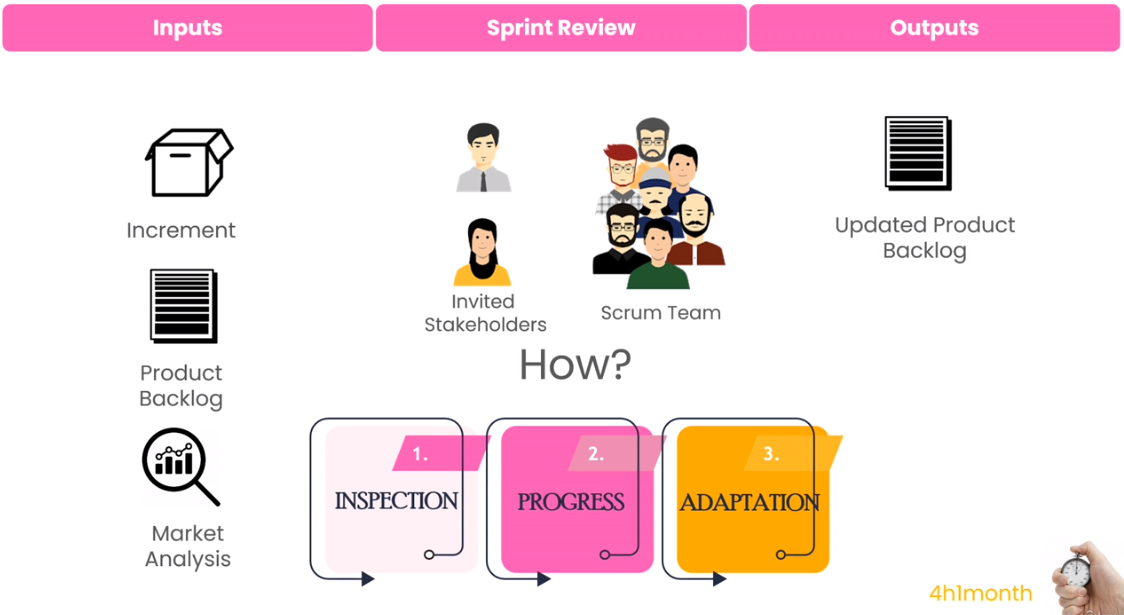
Held at the END of each Sprint.\ Time-boxed up to 4h.
Its Goal is to:
* Inspect the Increment or any other outcome of the Sprint and
* If needed, adapt the Product Backlog or determine any other future adaptations.
* Have transparency and collaboration between Scrum Team and Stakeholders.
* Have the Stakeholder be able to USE the Increment.
Who SHOULD participate:
* Users or Customers,
* Internal Stakeholders,
* Developers,
* The Scrum Master,
* PO
UNDONE work should NOT be presented in the Sprint Review. Sprint Review is NOT a Demo meeting.
* You must NOT present slides,
* screenshots,
* or similar
## Sprint Retrospective ⭐
It occurs after the Sprint Review.\ Time-boxed to up to 3h.
Is an opportunity for the Scrum Team to reflect on their methods and teamwork.\
It is about to make teams better and continuously improving.
The Scrum Master ensures that the event is positive and productive.
The hole Scrum Team SHOULD participate.
* Only the Scrum Team participates.
#### Examples of topics
* Interpersonal issues?
* Product quality issues?
* Definition of Done appropriate?
* Productivity issues?
* Process issues?
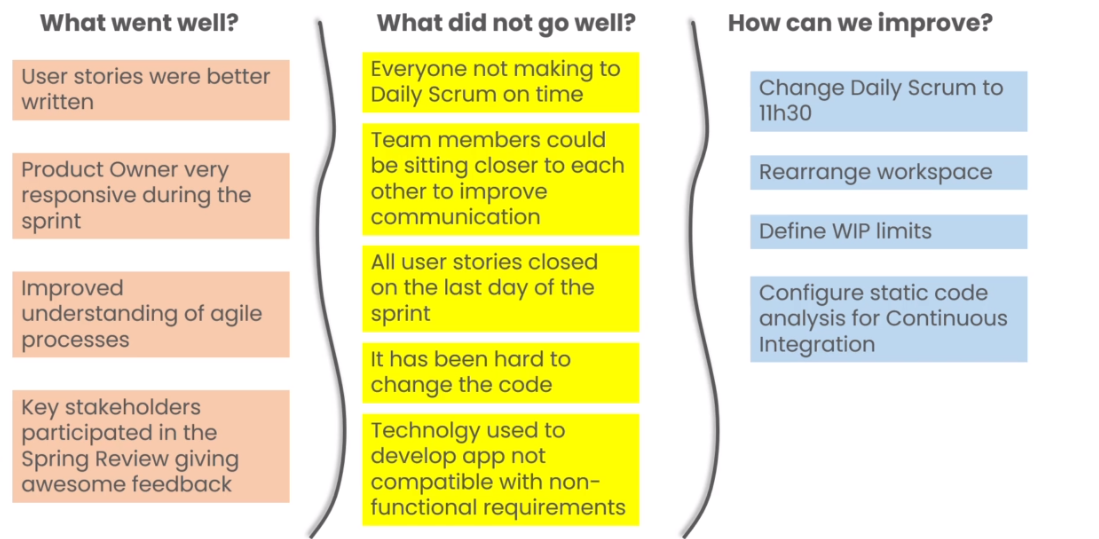
Usually have theses questions:
* What went well during the Sprint?
* What didn't go well?
* How can we improve?