# S3
## Simple Storage Service (S3)
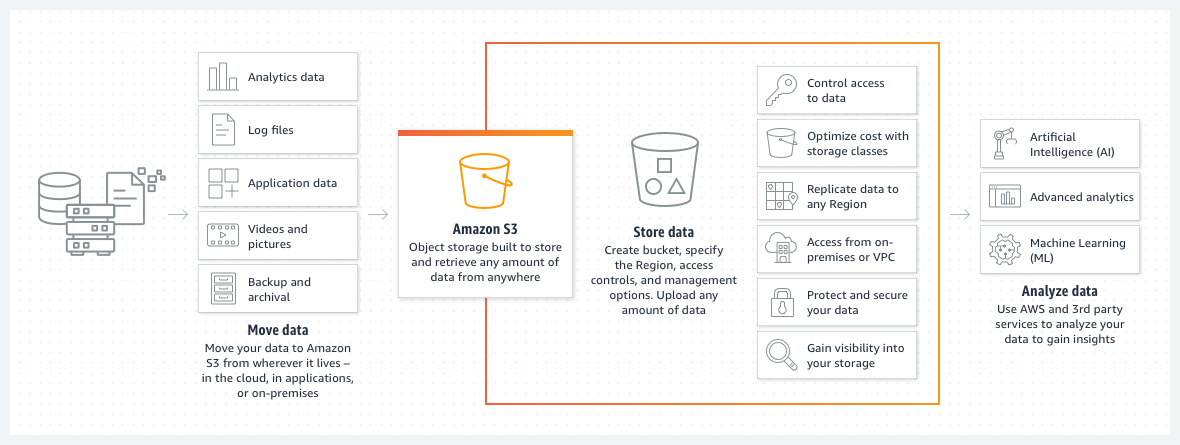
* Designed to store and access any type of data over the internet.
* It's a **serverless service**, and as such, we don't need to worry about what is behind it.
* You simply create a bucket, and upload thing to this bucket.
* The size of this bucket is theoretically unlimited.
* You can store virtually any amount of data, all the way to exabytes with unmatched performance.
* **`S3` if fully elastic, automatically growing and shirinking as you add and remove data.**
* You only pay for what you use.
* Provides the most durable storage in the cloud and industry leading availability, backed by the strongest SLAs in the cloud.
* Designed to provide 99.999999999% data durability.
* And 99.99% availability.
* `S3` is secure, private and encrypted by default.
* And supports numerous auditing capabilities to monitor access requests to `S3` resources.
> *If using to host front-end websites, you must make it `public` accessible.*
## S3 Storage Classes
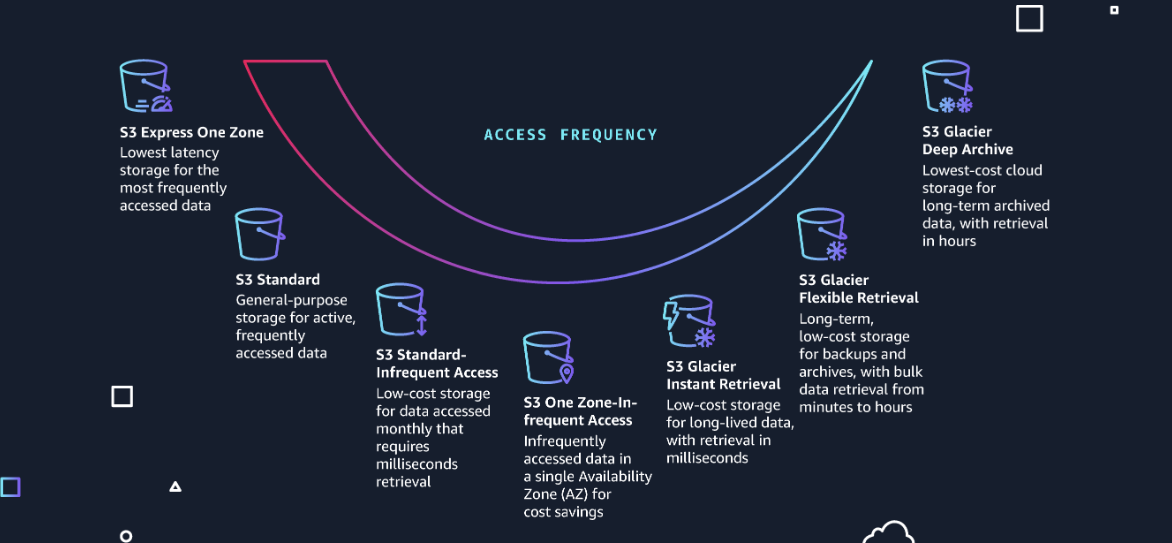
* Are a range of storage classes that you can choose from based on the data access, resiliency and cost requirements of your workloads.
* `S3 Intelligent-Tiering`: For automatic cost savings for data with unknown or changing access patterns.
* `S3 Standard`: For frequently accessed data.
* `S3 Express One Zone`: For your most frequently accessed data.
* `S3 Standard-Infrequent Acess`: For less frequently accessed data.
* `S3 Glacier Instant Retrieval`: For archive data that needs immediate access. *(1-5 minutes retrieval time)*
* `S3 Glacier Flexible Retrieval`: **(Formerly S3 Glacier)** For rarely accessed long-term data that does not require immediate access.\_ (3-5 hours retrieval time)\_
* `S3 Glacier Deep Archive`: For long-term archive and digital preservation with retrieval in hours at the lowest cost storage in the cloud. *(5-12 hours retrieval time)*
### **Glacier**
* `S3 Glacier` storage classes are purpose-built for data archiving.
* All 3 storage classes provide virtually unlimited scalability and are designed for 99.999999999% of data durability.
* There are storage classes with options to deliver fast access to your archives to lowest-cost archieve storage.
#### Bucket
* `S3` stores data as objects within `Buckets`.
* An object is a file and any metadata that describes the file.
* And each object has a `key` which is the unique identifier for the object within the Bucket.
* Total volume of data and numbers of objects are **unlimited**.
* 0 bytes to a maximum of 5TB.
* Largest pobject upload is 5GB.
* **Bucket's names must be unique** (`S3` has universal `namespaces`).
## Security
* `S3` is secure by default, *and can only be accessed with explicitly granted access permission*, but can be modified through:
* `IAM Policies` roles, users and groups.
* `Bucket Policies` applied at the bucket level.
* `Access Control Lists (ACL)` applied at the bucket and/or object level.
## Life Cycle Management
* Object *Deletion* after expiry time.
* Object *Archiving* to Glacier after expiry time.
* Can be restored from Glacier back to S3.
## Versioning
* Preserves copies of objects inside a bucket *(Like git)*.
* Individual objects can be restored to previous versions.
* Deleted objects can be recovered.
## Cross Region Replication
> CloudFront will do this replication for you. But for whatever other reason, you may do this with the Buckets themselves.
* Reduced latency for end users.
* Both source and destination buckets need versioning enabled if using versioning.
* `ACL` details updated.
* Will be migrated across from the source to the destination Bucket.
* If `S3` enabled encryption is in place on the source bucket, then that will be also replicated across the destination bucket.
* Need to copy existing objects to new region.
* Replication always takes place between a pair of `AWS Regions`.
* Buckets can be source buckets for another cross region replication.
## S3 Transfer Acceleration
* You can use this service to accelerate internet transfers of data **from** and **to** `S3`.
* *Also for transfers between AWS regions.*
* The cost is:
* `Internet -> S3` *(US, Europe and Japan)*: `$0.04 per GB`.
* `Internet -> S3` *(All other)*: `$0.08 per GB`.
* `S3 -> Internet`: `$0.04 per GB`.
* `Between AWS Regions`: `$0.04 per GB`.
* It is only advantageous for transfers up to 1TB of data.
* More than that consider using [#snowball-edge-device](#snowball-edge-device "mention").
## Amazon Macie
* Uses machine learning and pattern matching to **discover**, **classify** and **protect** these confidential data stored in `S3`.
* Sensitive data such as personally identifiable information (PII),
* *Personal data used to establish identity of someone.*
* Access controls and Encryption.
* `Macie` uses AI to recognize if your `S3` objects contain these PII types of data.
* Per region jobs.
* No charge for analysing up to 1GB of data each month.